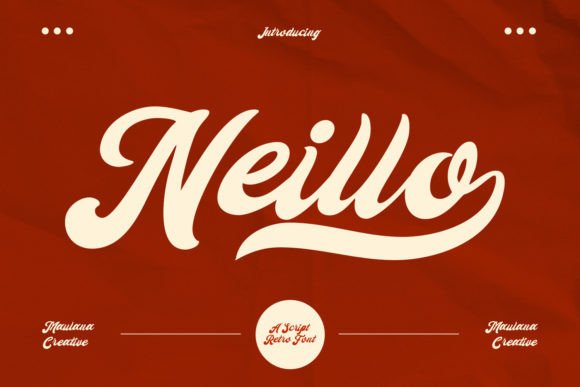
Neillo: A Fun, Retro Script Font That Elevates Your Design Game
Neillo is a fun, retro script font that brings a touch of nostalgia and personality to any design. With its natural and unique style, it fits perfectly into a wide range of creative projects—from logos and branding to social media posts and print materials. But while Neillo can be an excellent choice for many designers, there are common mistakes and overlooked details that can affect the final outcome. Understanding these pitfalls can help you make the most out of this versatile font.
What Is Neillo?
Neillo is a script font inspired by hand-drawn lettering, giving it a relaxed and playful feel. It’s ideal for projects that require a personal or artistic touch, such as invitations, posters, website headers, and even packaging designs. Its retro aesthetic makes it especially popular among those looking to evoke a sense of charm, authenticity, or vintage appeal.
The font’s uniqueness lies in its irregular stroke widths and slight imperfections, which mimic the look of handwriting. This makes it stand out from more rigid, modern fonts and adds character to any text it’s applied to.
Common Mistakes When Using Neillo
While Neillo is visually appealing, not everyone uses it correctly. Here are some common mistakes that can impact your design:
- Overusing the font: Applying Neillo to every element of a design can make it feel cluttered and unprofessional. It should be used sparingly, typically for headings or accents rather than body text.
- Ignoring legibility: Because of its cursive nature, Neillo may be difficult to read in small sizes or on low-resolution screens. Always test how the font looks at different sizes and distances before finalizing your design.
- Misusing it for formal contexts: While Neillo is great for creative and casual projects, it might not be suitable for formal documents like contracts, reports, or academic papers where clarity and professionalism are key.
- Not pairing it with complementary fonts: Using Neillo alone can sometimes make a design feel incomplete. Pairing it with a sans-serif font for body text ensures readability while maintaining visual interest.
How These Mistakes Affect Your Work
Each of these mistakes can have real consequences. For example, overusing Neillo can make your design appear unrefined or even untrustworthy, especially if it’s intended for business or professional use. Poor legibility can lead to confusion or misinterpretation, particularly if the text contains important information.
Choosing the wrong context for Neillo can also result in a mismatch between the message and the medium. Imagine using this playful font for a legal document—while it might look cute, it could undermine the seriousness of the content.
Lastly, failing to pair Neillo with other fonts can create a design that feels disjointed or unbalanced. A well-thought-out font combination enhances the overall look and improves user experience.
Practical Advice for Using Neillo Effectively
To avoid these issues, consider the following tips:
- Use it for emphasis: Reserve Neillo for headlines, titles, or call-to-action buttons. This way, you maintain the font’s impact without overwhelming the rest of your design.
- Test for legibility: Always check how the font appears at various sizes and on different devices. If necessary, adjust the size or choose a similar but more readable alternative for smaller text.
- Match the tone: Consider the purpose of your project. If you're designing something serious, opt for a more traditional font and save Neillo for decorative elements.
- Pair wisely: Combine Neillo with a clean, sans-serif font for body text. This contrast helps guide the reader’s eye and maintains visual harmony.
What to Check Before Using Neillo
Before incorporating Neillo into your design, take a moment to evaluate a few key factors:
- License type: Ensure you understand the licensing terms. Some fonts come with restrictions on commercial use, so always verify that you’re allowed to use Neillo for your intended project.
- Font quality: Download the font from a reputable source to ensure you’re getting a high-quality file. Avoid pirated versions, which can cause technical issues or legal problems.
- Compatibility: Check if Neillo works well with your design software. Some fonts may not render correctly in certain programs, leading to unexpected results.
- Color and contrast: The color you choose to pair with Neillo can significantly affect its appearance. Use tools like Adobe Color or Coolors to find complementary colors that enhance readability and aesthetics.
Final Thoughts on Choosing Neillo
Neillo is a fantastic font that can add a unique and charming touch to your designs. However, like any tool, it requires thoughtful application to achieve the best results. By avoiding common mistakes and considering the right context, you can use Neillo effectively and confidently.
Whether you're a beginner or an experienced designer, taking the time to understand how and when to use Neillo will help you create more engaging and professional-looking work. Remember, the goal is not just to use a stylish font, but to use it in a way that supports your message and enhances the overall design experience.