Gersival Script: A Modern Hand Lettering Font for Creative and Professional Workflows
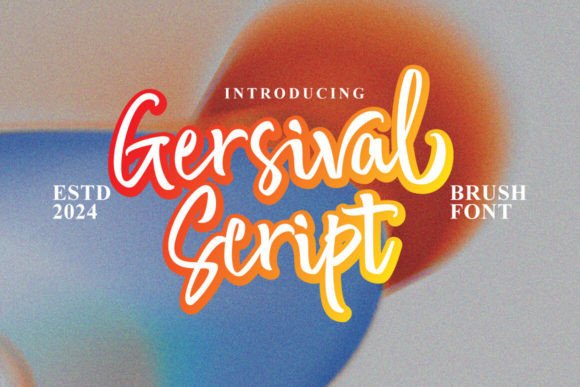
Gersival Script is a hand lettering font that bridges the gap between modern fashion, streetwear aesthetics, and traditional calligraphy. Designed with a lively baseline that adds bounce to every stroke, it brings a dynamic energy to text while maintaining a sense of readability and style. This font is ideal for creative professionals, entrepreneurs, and designers who need a versatile tool for branding, packaging, social media, and more.
Understanding Gersival Script’s Design Philosophy
Gersival Script draws its inspiration from the fast-paced world of streetwear and contemporary fashion. Its characters are crafted with an emphasis on rhythm and movement, making it feel both modern and approachable. The font features a unique baseline that gives each letter a slight lift, creating a visual flow that mimics handwritten strokes.
This design philosophy makes Gersival Script particularly well-suited for projects that require a touch of personality without sacrificing professionalism. Whether you're designing a logo, creating product packaging, or crafting social media content, this font offers a balance between artistic flair and practicality.
Integrating Gersival Script into Your Workflow
Incorporating Gersival Script into your workflow can be done at various stages of a project. During the planning phase, it can serve as a visual guide for how text will appear in final designs. When executing a design, using Gersival Script allows for quick adjustments and experimentation with typography styles.
For instance, when designing a brand identity, start by selecting Gersival Script as the primary font for headlines or taglines. Pair it with a complementary marker font for contrast, ensuring that the overall look remains cohesive. This combination works especially well for logos, headers, and promotional materials where visual impact is key.
Pre-Project Considerations
Before starting any project that involves Gersival Script, consider the following:
- Compatibility: Ensure that the font file is compatible with your design software. Most modern graphic design tools support OpenType fonts, which include Gersival Script.
- Readability: Test the font in different sizes and weights to ensure that it remains legible across all platforms and mediums.
- Consistency: Establish a style guide that outlines how Gersival Script should be used throughout your brand or project to maintain a unified aesthetic.
During Project Execution
Once you've decided to use Gersival Script, integrate it into your design process by:
- Selecting appropriate text elements such as headings, subheadings, or quotes that benefit from a hand-lettered feel.
- Experimenting with spacing, kerning, and alignment to achieve the desired visual effect.
- Pairing it with other fonts—such as sans-serif or serif fonts—for added depth and contrast.
- Using the bonus swashes included in the font to add decorative flourishes where needed.
Use Cases for Gersival Script
Gersival Script is incredibly versatile and can be applied to a wide range of creative and professional tasks. Here are some common use cases:
- Logos and Branding: Use Gersival Script for company names, slogans, or taglines to give your brand a distinctive and memorable identity.
- Social Media Graphics: Incorporate the font into Instagram posts, Facebook banners, or Twitter headers to add a personal touch to your content.
- Product Packaging: Apply Gersival Script to labels, boxes, or tags to create an eye-catching and stylish presentation.
- Merchandise Design: Print t-shirts, mugs, or tote bags with custom text using Gersival Script for a unique and fashionable look.
- Handwritten Quotes: Create beautiful quote cards or greeting cards with a hand-lettered appearance that feels authentic and expressive.
Practical Tips for Using Gersival Script
To make the most of Gersival Script, consider these practical tips:
- Experiment with Layering: Combine Gersival Script with other fonts to create layered text effects that add dimension and interest.
- Adjust Baseline Settings: Modify the baseline settings in your design software to fine-tune the bounce and rhythm of the letters.
- Use Swashes Sparingly: While the bonus swashes can enhance your designs, avoid overusing them to prevent clutter and maintain readability.
- Test Across Devices: Check how Gersival Script appears on different screens and devices to ensure that it looks consistent and professional everywhere.
Long-Term Integration and Quality Control
When integrating Gersival Script into your long-term workflow, focus on consistency and quality control. Develop a set of best practices for using the font across different projects and formats. This includes defining standard font sizes, spacing guidelines, and color schemes that work well with Gersival Script.
Additionally, keep track of how the font performs in different contexts. For example, if you're using it for digital marketing materials, ensure that it renders correctly on mobile devices. If you're printing physical materials, verify that the font remains sharp and clear at various print sizes.
By establishing these standards early on, you'll save time and effort in the long run, ensuring that your designs remain visually appealing and professionally executed.
Conclusion
Gersival Script is more than just a font—it's a creative tool that enhances the visual appeal of your projects while maintaining a strong connection to modern design trends. Whether you're working on branding, packaging, or social media content, this font offers a unique blend of style and functionality that can elevate your work.
By understanding how to use Gersival Script effectively within your workflow, you can create designs that stand out and resonate with your audience. With careful planning, thoughtful execution, and ongoing refinement, you'll find that this font becomes an essential part of your creative toolkit.