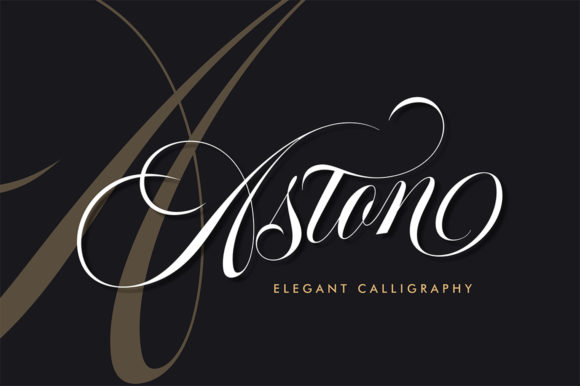
Aston: Elevating Design with Elegant Calligraphy
Aston is a beautiful calligraphy script that brings a sense of sophistication and modern elegance to any design project. With its flowing curves and refined strokes, it stands out as a versatile tool for professionals and creatives across various industries. Whether you're designing a brand identity, crafting wedding invitations, or creating logos, Aston can help elevate your work to new heights.
Understanding the Role of Aston in Design Workflows
Incorporating Aston into your design workflow means choosing a font that not only looks good but also serves a functional purpose. It's important to understand where Aston fits within the broader process of creating visual content. From initial concept development to final execution, Aston can be used at different stages to enhance the overall aesthetic and readability of your designs.
Before starting a project, consider how Aston will complement the other elements of your design. For instance, if you're working on a branding project, using Aston for headings can create a strong visual hierarchy while maintaining a cohesive look throughout the brand materials.
Using Aston During the Creative Process
During the creative process, Aston can be employed to add personality and flair to your designs. This could include using it for headlines in marketing materials, adding signature elements to business cards, or even incorporating it into digital interfaces such as website headers or mobile app buttons.
- Headlines and Titles: Aston is particularly effective when used for large text elements like headlines or titles. Its elegant style draws attention and sets a tone that matches high-end brands or premium products.
- Logos and Branding: When developing a logo, Aston can serve as a unique identifier for your brand. Its distinctive appearance helps make your logo stand out from competitors while conveying professionalism and style.
- Wedding Invitations: For those planning a wedding, Aston offers an excellent option for creating personalized invitations that reflect the couple’s taste and personality. The script adds a romantic touch that complements traditional elements like floral patterns or vintage illustrations.
Integrating Aston with Other Tools and Resources
To maximize the potential of Aston, it's essential to integrate it with other tools and resources commonly used in design workflows. This includes graphic design software like Adobe Illustrator or Photoshop, web development platforms such as WordPress or Shopify, and digital asset management systems.
When working with Adobe Illustrator, for example, you can easily apply Aston to vector graphics by selecting the appropriate font from the type menu. This allows for greater flexibility in scaling and manipulating text without losing quality.
For web developers, embedding Aston into websites requires ensuring compatibility with different browsers and devices. Using web-safe fonts or embedding custom fonts via Google Fonts ensures that the text remains consistent across all platforms.
Practical Implementation Tips
Implementing Aston effectively involves considering several factors including preparation, usability, and long-term use. Here are some practical tips to help you get started:
- Choose the Right Format: Depending on your needs, select between TrueType (.ttf), OpenType (.otf), or Web Font formats. Each format has its own advantages based on the platform you're working on.
- Test Across Devices: Always test how Aston appears on different screen sizes and resolutions. This helps ensure that your design remains visually appealing regardless of where it's viewed.
- Combine with Complementary Fonts: Pairing Aston with sans-serif fonts can create a balanced look that enhances readability without compromising style.
By following these implementation tips, you can ensure that Aston integrates smoothly into your workflow while maintaining the desired aesthetic appeal.
Workflow Examples and Useful Observations
Let's explore how Aston can be integrated into specific workflows across various industries:
Branding: When developing a brand identity, start by defining the core values and aesthetics of the brand. Use Aston for key elements such as logos, taglines, and promotional materials. Ensure consistency by applying the same font across all branding assets to maintain a unified look.
Marketing Materials: In marketing campaigns, Aston can be used creatively in posters, banners, and social media posts. It adds visual interest and helps capture attention quickly. However, it's important to balance its use so that it doesn't overshadow other important information.
Personal Projects: For personal projects such as creating a blog or designing a portfolio, Aston can add a professional touch to headings and titles. It creates a polished look that reflects the quality of your work.
Factors Influencing Success with Aston
The success of using Aston in any project depends on several factors including preparation, compatibility, usability, organization, efficiency, consistency, quality control, and long-term use. Here are some observations that highlight these aspects:
- Preparation: Before implementing Aston, research its features and limitations. Understand how it interacts with different software and platforms to avoid compatibility issues later on.
- Compatibility: Ensure that Aston works well with the tools you're using. Test it thoroughly before finalizing any design to prevent unexpected results.
- Usability: Choose a font that's easy to read and aesthetically pleasing. Avoid overcomplicating your designs by using too many different styles or fonts.
- Organization: Keep your files organized by separating fonts into folders based on their usage. This makes it easier to locate and access them when needed.
- Efficiency: Streamline your workflow by setting up templates that include Aston as part of the standard design elements. This saves time and ensures consistency across multiple projects.
- Consistency: Maintain a consistent look by applying Aston uniformly throughout your designs. This helps reinforce brand recognition and improves user experience.
- Quality Control: Review your designs regularly to ensure that they meet the desired standards. Make adjustments as necessary to achieve the best possible outcome.
- Long-Term Use: Consider the longevity of your designs when choosing fonts. Opt for ones that remain relevant and continue to be supported over time.
By keeping these factors in mind, you can ensure that Aston becomes an integral part of your creative process and contributes positively to your overall design outcomes.